


Overview
Free customizable new tab dashboard with widgets: to-do, weather, Pomodoro, stocks, Gmail, notes & more. Drag, resize, sync.
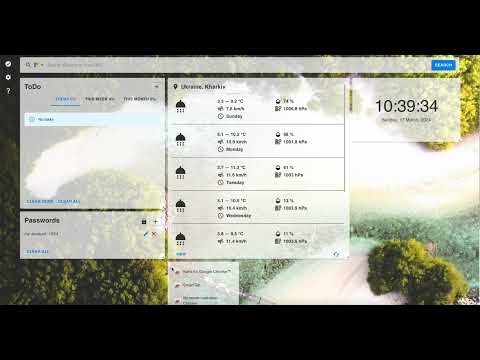
SmartTab — Your Free Custom New Tab Dashboard for Chrome Turn every new tab into a personal productivity dashboard. SmartTab replaces Chrome’s blank new tab with a beautiful, fully customizable start page packed with widgets you actually use — to-do lists, weather, focus timers, stocks, crypto, Gmail, notes, birthdays & events, and more. No account required. 100% free. Set up in under a minute. ━━━━━━━━━━━━━━━━━━━━ WHY SMARTTAB? ━━━━━━━━━━━━━━━━━━━━ Most new tab extensions give you a wallpaper or a clock. SmartTab gives you a complete command center — drag-and-drop widgets, four color themes, custom backgrounds, and settings that sync across your Chrome devices. Whether you’re a student, remote worker, developer, or anyone who opens dozens of tabs a day, SmartTab helps you start every session focused and organized. ━━━━━━━━━━━━━━━━━━━━ KEY FEATURES ━━━━━━━━━━━━━━━━━━━━ 🎯 PRODUCTIVITY • To-Do List — daily, weekly, and monthly task tracking • Pomodoro Focus Timer — customizable work/break cycles to stay in the zone • Notes — capture ideas instantly, right on your new tab • Daily Quote — fresh inspiration every day • What’s Today — birthdays, custom events, and public holidays in one widget 🌤 INFORMATION AT A GLANCE • Weather — live forecast with current temperature, °C / °F, compact or expanded layout • World Clocks — track time across multiple cities and time zones • Clock & Calendar — always know the date and time 💰 MARKETS & FINANCE • Stocks — track AAPL, TSLA, NVDA, GOOGL & more with interactive charts • Cryptocurrency — live rates for BTC, ETH, SOL and other coins with chart views 📬 STAY CONNECTED • Gmail Widget — preview your latest unread emails without leaving the tab • Quick Links — pin your favorite sites as one-click shortcuts with favicons • Top Sites — jump to your most-visited pages instantly • Built-in Search Bar — Google, Bing, Yahoo, or DuckDuckGo 🔐 PERSONAL TOOLS • Password Manager — store passwords locally with PIN protection • Secure & private — your data stays in your browser 🎨 FULL CUSTOMIZATION • Drag & resize widgets — build the layout that fits your workflow • 4 color themes — Dark, Light, Sunset, and Mocha • Backgrounds — 15+ images, gradient presets, solid colors, or upload your own • Dim overlay & blur — fine-tune readability over any background • Transparent or contained widget cards — match your aesthetic • Toggle any widget on or off — only show what you need ☁️ SYNC ACROSS DEVICES • Layout, settings, and widget data sync via Chrome Sync — same dashboard on every device ━━━━━━━━━━━━━━━━━━━━ WHO IS SMARTTAB FOR? ━━━━━━━━━━━━━━━━━━━━ ✓ Students managing tasks and deadlines ✓ Remote workers tracking time zones and focus sessions ✓ Developers who want a clean, information-rich start page ✓ Crypto & stock traders monitoring markets from a new tab ✓ Anyone who wants birthdays, holidays, and daily events at a glance ✓ Anyone tired of Chrome’s empty new tab page ━━━━━━━━━━━━━━━━━━━━ FREE. NO CATCH. ━━━━━━━━━━━━━━━━━━━━ SmartTab is completely free with no premium tier, no credit card, and no ads on your dashboard. Install it, customize it, and use every feature. ━━━━━━━━━━━━━━━━━━━━ PRIVACY & SECURITY ━━━━━━━━━━━━━━━━━━━━ Your privacy matters. SmartTab stores data locally in your browser. Gmail access uses Google OAuth and is optional — only enabled if you turn on the Email widget. Public holidays use your country (from weather location or a manual country code). We never sell your data. Privacy Policy: https://fireplugs.github.io/privacy.html Terms of Use: https://fireplugs.github.io/terms.html ━━━━━━━━━━━━━━━━━━━━ LINKS ━━━━━━━━━━━━━━━━━━━━ 🏠 Homepage: https://fireplugs.github.io/ 🚀 Product Hunt: https://www.producthunt.com/posts/smarttab ━━━━━━━━━━━━━━━━━━━━ WHAT’S NEW — v1.0.3.1 ━━━━━━━━━━━━━━━━━━━━ NEW WIDGET • What’s Today — track birthdays and custom yearly events, see public holidays for your country, and browse Today / Upcoming / All views • Birthday reminder — friendly popup when someone has a birthday today (optional, once per tab session) NEW CUSTOMIZATION & SETTINGS • What’s Today settings — toggle public holidays, override country code, enable/disable birthday popup • Unified widget tabs — Tasks and Events use the same clean tab style across widgets WEATHER UPGRADES • Current temperature shown beside the weather icon • Clearer today highlight with min/max range • More reliable forecast data pipeline LAYOUT & UI IMPROVEMENTS • Smoother widget arrange mode — fixed layout jump when entering/exiting edit mode; clearer on-screen hint • Smarter drag & resize — better min/max sizes, placement, and overlap prevention across widgets • Dashboard stays stable when DevTools is open (left, right, or bottom dock) • Unified widget header controls (+, menu, toggles) across Gmail, Tasks, Notes, Passwords, Weather, and more • Fixed overlapping text, buttons, and action icons in compact widget sizes • Polished Settings panel spacing and dialog layouts GMAIL & PERFORMANCE • Gmail widget UI refresh and loading improvements • General performance and stability fixes across widgets PREVIOUS UPDATES • v1.0.3.0 — Pomodoro, Stocks, Quick Links, World Clocks, Daily Quote, Sunset & Mocha themes, gradient/solid backgrounds, weather & market API updates • v1.0.2 — Chrome Sync across devices • v1.0.2.2 — Gmail widget loading fix • v1.0.2.3 — Weather geo API update • v1.0.2.4 — Weather horizontal layout support Click “Add to Chrome” and make your new tab work for you.
4.8 out of 512 ratings
Details
- Version1.0.3.2
- UpdatedJune 17, 2026
- Size16.53MiB
- LanguagesEnglish
- DeveloperWebsite
Email
projectiris77@gmail.com - Non-traderThis developer has not identified itself as a trader. For consumers in the European Union, please note that consumer rights do not apply to contracts between you and this developer.
Privacy

This developer declares that your data is
- Not being sold to third parties, outside of the approved use cases
- Not being used or transferred for purposes that are unrelated to the item's core functionality
- Not being used or transferred to determine creditworthiness or for lending purposes
Support
For help with questions, suggestions, or problems, please open this page on your desktop browser